Simple & Powerful
Amateur Radio
Logbook

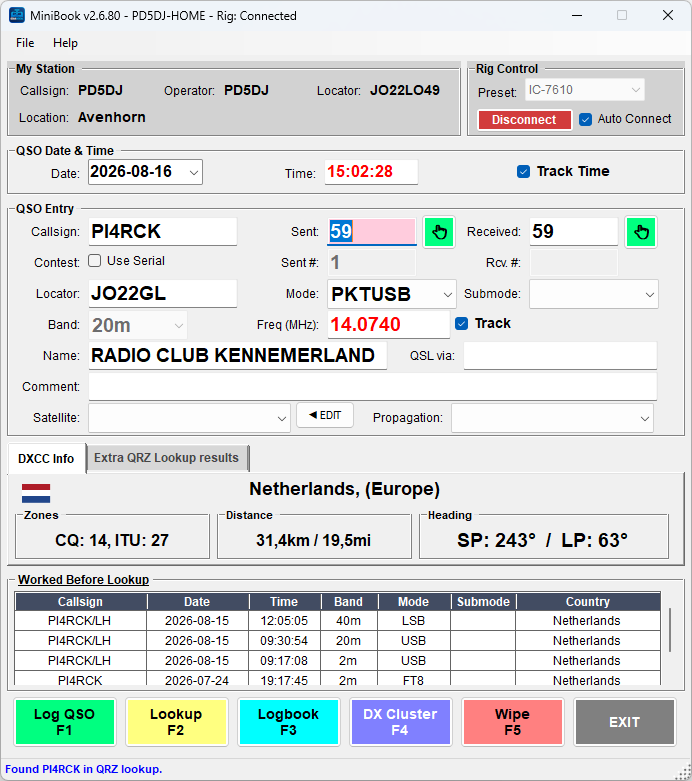
MiniBook is a logbook for amateur radio operators. Built-in Hamlib rig control — connect directly via serial CAT or TCP rigctld, with an integrated DX Cluster client, QRZ lookup & logbook upload, ClubLog upload, full LoTW integration, ADIF import/export, and DXCC statistics — all in one application.

MiniBook main window
🎉
New release

Version 2.7.0 Released!

The big QSL printing release — label printing, label sheets, pre-printed cards and a print queue, all straight from the logbook.

What's New — QSL Printing

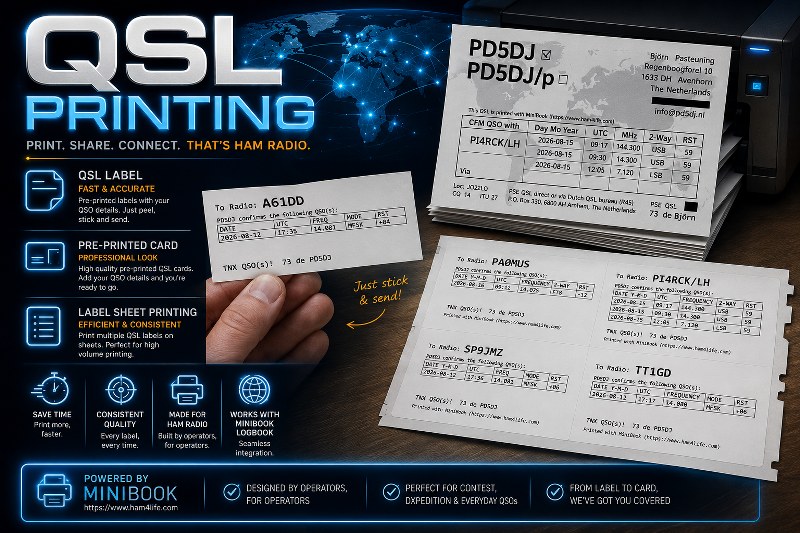
Print your QSL confirmations straight from the logbook — roll labels, label sheets, pre-printed cards, and a print queue.

QSL printing with MiniBook — labels, pre-printed cards and label sheets
🏷️

QSL Label Printing

Print address-style QSL labels on a label printer or any ordinary printer. Fully designable template — a header, a QSO table with several contacts per label, and a footer — with a live true-size preview and text tokens like {CALL} and {QSL_VIA_TAG}.

roll labels templates multi-QSO
📄

QSL Label Sheet Printing

Print a whole grid of labels on one sheet, on any ordinary printer. Measure the sheet once — columns, rows, label size, spacing — with Center Labels and Fill page to do the maths for you. When printing you pick which label to start at, so a part-used sheet gets filled up instead of wasted.

label sheets sheet layout start anywhere
🖇️

QSL Pre-Print Card Printing

Overlay only the variable QSO data onto your own pre-printed QSL cards at exact millimetre positions. Per-printer calibration, self-rotation, multiple QSOs per card, custom text lines, and Mask & Mark blocks/crosses (e.g. to strike out Please/TNX QSL). Cards print one at a time for reliable manual feeding.

mm-precise calibration manual feed
🗂️

QSL Print Queue

Collect QSOs from the logbook into a queue and print the whole batch later as labels, sheets or cards. The queue is saved between sessions, remembers which QSOs were already printed, and can mark them QSL Sent automatically after printing.

batch persistent

Read the QSL Printing guide →

Everything you need to log

Built for everyday DX logging — fast, simple, and always ready.

📡

Built-in Rig Control

Hamlib rig control is built directly into MiniBook. Connect via serial CAT or TCP rigctld — no separate server tool needed. Hundreds of transceivers supported.

Hamlib serial CAT rigctld
🔄

QSY Wipe

Automatically clears all QSO entry fields when the rig frequency changes beyond a configurable threshold (1–10 kHz). Keeps your workflow clean when you change frequency.

configurable 1–10 kHz
📖

JSON Logbook

Logbooks stored as open JSON files with automatic version detection and migration. Multiple logbooks supported. Incremental backups with timestamps.

JSON backup multi-log
🌍

DXCC Entities

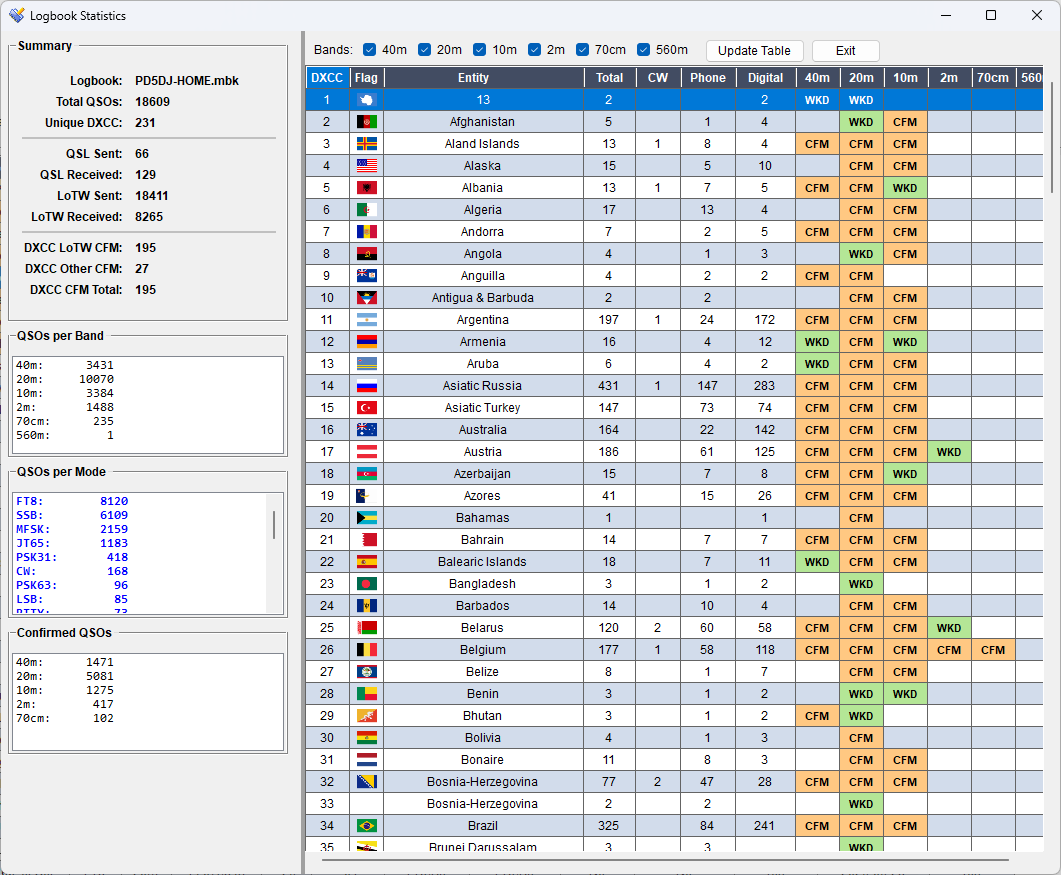
Automatic country lookup using cty.dat. DXCC entity numbers, country flags, continent, and CQ/ITU zones. Statistics window with analytics by entity.

cty.dat flags statistics
🔍

QRZ.com Lookup & Logbook Upload

Auto-trigger QRZ lookup on TAB from the callsign field. Name, city, QSL info, locator — all filled automatically. Upload individual or bulk QSOs directly to your QRZ.com logbook with live status feedback. Right-click any QSO to Update Station with QRZ Lookup — corrects country, locator, name, and DXCC from QRZ data.

API bulk upload auto-fill
LoTW

LoTW Integration

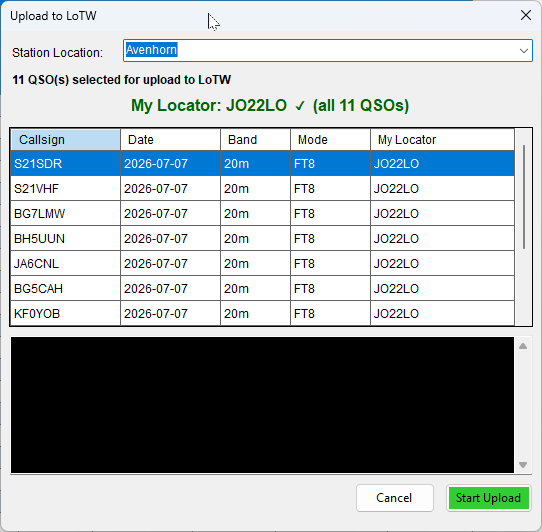
Full Logbook of the World integration via TQSL. Select QSOs and upload to LoTW directly from the right-click menu — a preview window shows selected contacts and a live terminal streams TQSL output. Check LoTW confirmations automatically: MiniBook queries the LoTW API and matches confirmed QSOs against your logbook.

TQSL upload confirmations
Club Log

Club Log Upload

Upload QSOs to Club Log automatically after logging (like QRZ), or bulk-upload selected QSOs via right-click in the Logbook window. Credentials (email, application password) stored per logbook in Station Setup.

auto-upload bulk upload per-logbook
🏆

Serial Number Support

Basic serial number logging for sent and received exchanges — useful for simple contest-style operation. For serious contesting, use a dedicated logger like N1MM+.

STX / SRX auto-increment
🛰

Satellite Support

Dedicated satellite field with user-editable satellite list (satellites.txt). Satellite names are imported and exported in ADIF format.

ADIF user-defined
📊

Dupe Check

Real-time duplicate detection while typing a callsign. Worked today shown in orange, worked before in blue. Duplicate QSO finder for bulk cleanup.

real-time color-coded
📋

Logbook Viewer

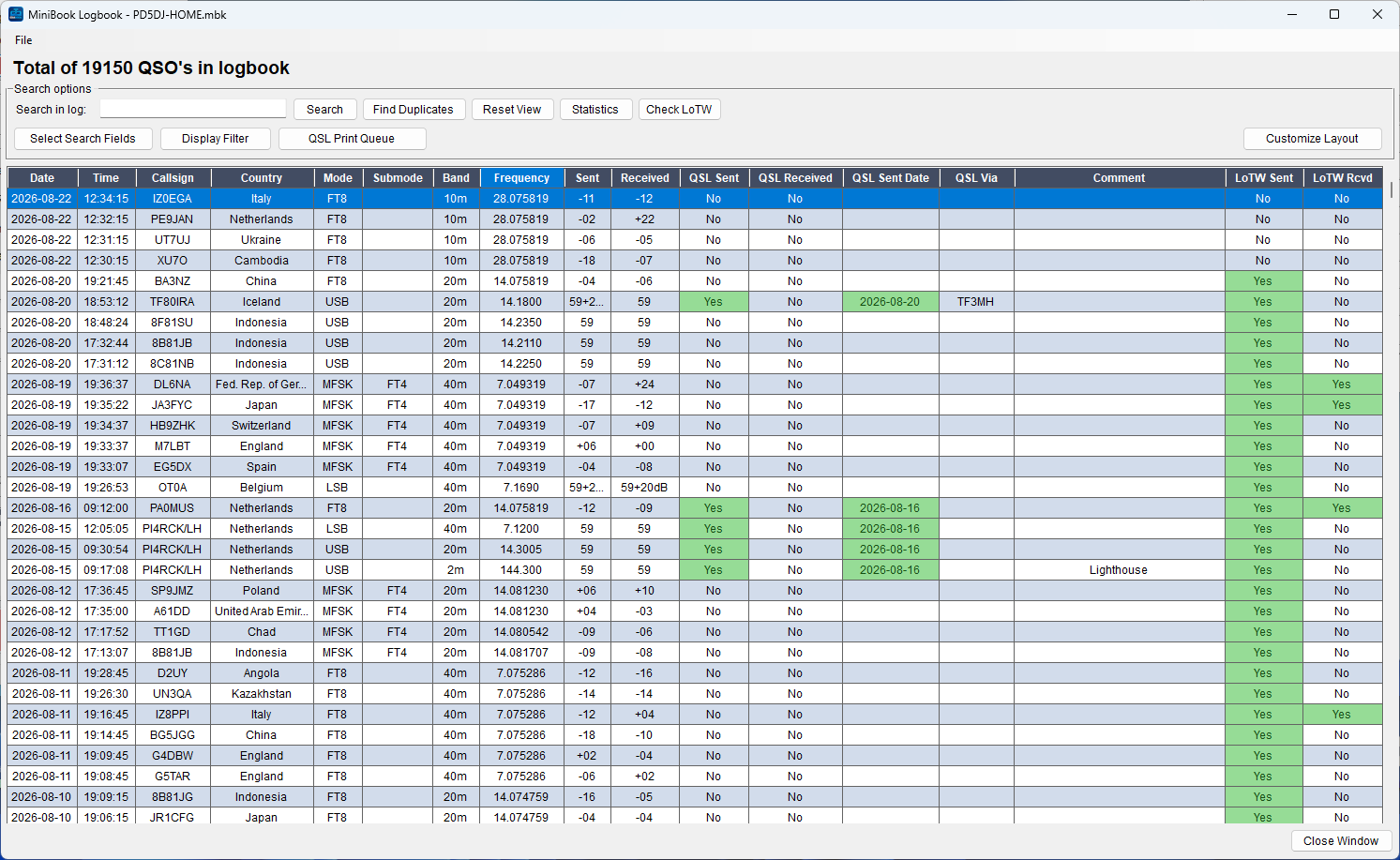
Sortable treeview with column visibility selector. Bulk edit, quick QSL update, right-click context menu. Search and filter across all records.

sort filter bulk edit
📍

Locator & Distance

Maidenhead grid locator input with automatic heading and distance calculation. Validated locator checking during QSO entry.

Maidenhead bearing
⚙️

Settings & Config

All settings stored in the Windows AppData folder. INI-based configuration with automatic migration from legacy paths. Per-user settings, no admin rights required.

AppData auto-migrate

Integrated DX Cluster

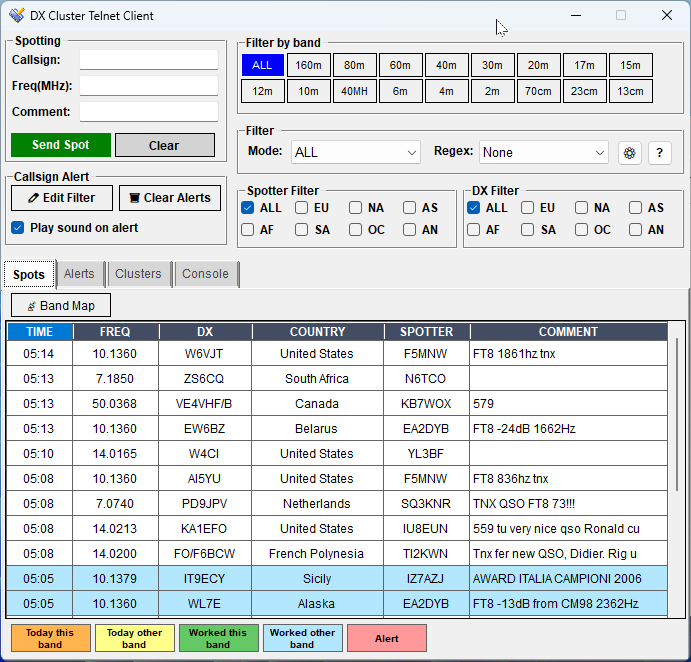
A full telnet DX Cluster client, built into MiniBook.

  • ✓
    One-click QSY — click any spot to instantly populate callsign, frequency, and mode in the logbook and send to rig via Hamlib.
  • ✓
    Band & Mode filters — filter by HF/VHF/UHF/SHF or individual band. CW, FT8, FT4, digital, phone mode filters.
  • ✓
    Custom REGEX filters — define advanced per-user spot filters with regex patterns. Built-in help guide.
  • ✓
    Spotter continent filter — filter spots by spotter continent (ALL · EU · NA · AS · AF · SA · OC · AN). Cuts through noise from other continents. Selection is saved between sessions.
  • ✓
    DX continent filter — filter spots by the DX station's continent (ALL · EU · NA · AS · AF · SA · OC · AN). Show only DX from a specific part of the world. Selection is saved between sessions.
  • ✓
    Callsign alerts — monitor specific callsigns. Red highlight and optional Windows alert sound on new spot.
  • ✓
    Color-coded spots — worked before (blue), worked today (orange), self-spot (green), alert match (red).
  • ✓
    Multiple cluster servers — manage a list of DX Spider servers. Auto-reconnect every 5 seconds on drop.
  • ✓
    Send spot — transmit your own spots directly from the interface with callsign, frequency, and comment fields.
  • ✓
    Console tab — view raw telnet output with scrollable terminal-style display.
DX Cluster window

Screenshots

MiniBook in action — main window, DX Cluster, Band Map, LoTW upload, logbook viewer, and DXCC statistics.

MiniBook main window
Main QSO Entry Window
DX Cluster client
DX Cluster Telnet Client
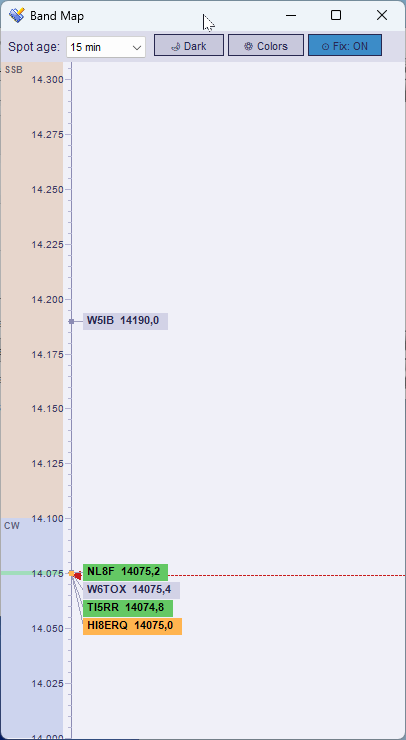
Band Map
Band Map — live VFO line with spot positions
LoTW upload window
LoTW Upload — live TQSL terminal
Logbook viewer
Logbook Viewer
DXCC Statistics
DXCC Statistics with confirmed counts

WordPress & HTML Plugin

Publish your live station status to any website — with WordPress shortcodes, sidebar widgets, or a standalone HTML snapshot file.

MiniBook broadcasts live station data over UDP at a configurable interval. No polling, no persistent connection, no credentials stored on the server — just a simple push-based snapshot that your website displays.

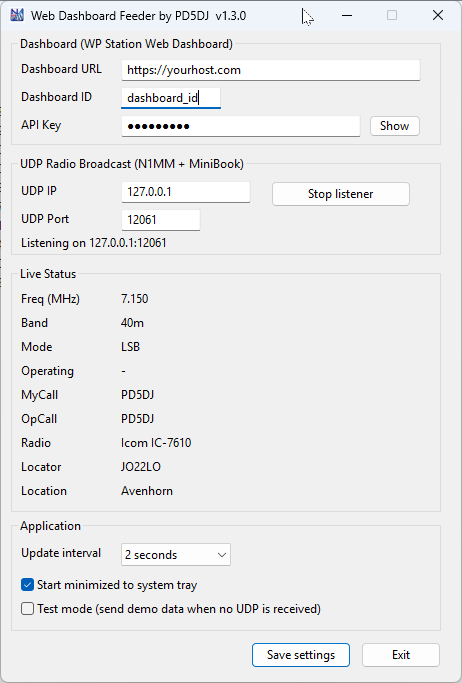
ℹ️ Web Dashboard Feeder required. MiniBook no longer posts to WordPress directly. Install the free Web Dashboard Feeder — a small universal bridge that receives MiniBook's UDP broadcast and forwards it to the WordPress Dashboard Plugin (or any compatible endpoint).

WordPress Plugin Mode

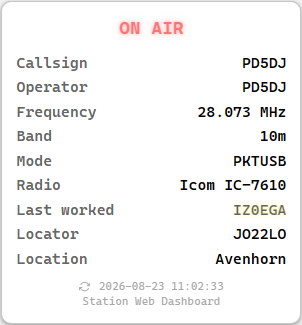
Install the plugin via the WordPress admin panel and embed your station dashboard anywhere using a shortcode or sidebar widget. The plugin stores the latest snapshot received from the Web Dashboard Feeder and renders it in real time — no page reload required.

  • Shortcode — [station_dashboard id="…"] on any page or post
  • Card type — detected automatically from the feeder (MiniBook, HRD, Log4OM2)
  • Style options — default, compact, text, card-text, cards, horizontal and their compact variants
Web Dashboard Feeder application
Web Dashboard Feeder — UDP → WordPress
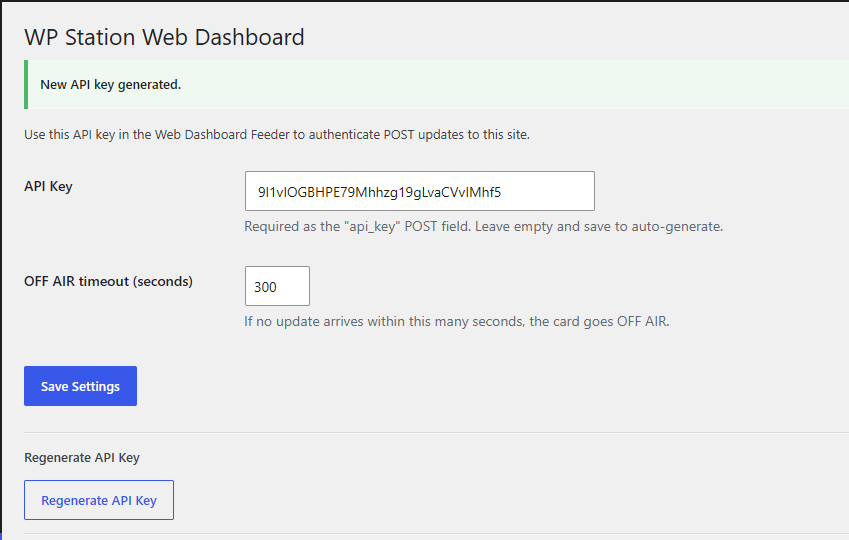
WordPress Plugin Settings page
WordPress — Plugin settings & API key

Shortcode & Sidebar Widget

Drop the dashboard on any page or post with the [station_dashboard] shortcode, or add it as a sidebar widget. Only the station id is needed — the card type is detected from whatever feeds the feeder:

[station_dashboard id="IC7610"]

Optional attributes: style, theme and title. The same card also serves Ham Radio Deluxe and Log4OM2. See the guide for the full reference.

Standalone HTML (Non-WordPress)

For non-WordPress sites, the plugin also produces a standalone HTML snapshot and a live endpoint you can embed via an <iframe> on any HTML page — no shortcode required.

Standalone HTML embed via iframe
HTML snapshot embedded via iframe
⬇ Download Plugin ⬇ Download Feeder Installation guide →

Integrations & Formats

Connect MiniBook to your existing tools and workflows.

📤

ADIF Import / Export

Import with encoding detection (UTF-8 / LATIN-1). Export in standard ADIF format. Duplicate detection with overwrite option.

🔊

UDP ADIF (WSJT-X)

Receive ADIF records via UDP from WSJT-X or any compatible application. Configurable port. Automatic QSO processing in background thread.

🌐

Web Dashboard

Push QSO data to a WordPress dashboard. Configurable URL, API key, and update interval. Real-time overview of your station activity online.

LoTW

LoTW & QSL

Full LoTW integration via TQSL: upload selected QSOs with live terminal output, check confirmations automatically via the LoTW API. QSL and LoTW status tracked per QSO.

Club Log

Club Log

Auto-upload each QSO to Club Log immediately after logging, or bulk-upload selected QSOs via right-click in the Logbook window. Credentials stored per logbook.

Changelog

Recent releases and changes.

23-08-2026 2.7.0 RELEASEQSL printing, top to bottom — A third way to print: QSL Label Sheet Printing puts a whole grid of labels on one sheet on any ordinary printer. You measure a box of labels once in its own Sheet layout window (with Center Labels and Fill page doing the arithmetic), design a single label at true size, and when printing you click which label to start at, so a part-used sheet is filled up instead of thrown away. All three print windows now share the same head — template, printer, paper, tray and Paper type, plus Printer setup… — and every printer’s unprintable border is shown in red in the preview, so you can see before printing whether a label or card runs into it. QSL Pre-Print Card Printing now edits Fields, Custom text and Mask & Mark as tabs with a live preview, with separate feed/text rotation and an X/Y anchor per field. The print queue moved into the logbook itself (so it travels with it), can fill itself from newly logged QSOs via the new QSL Handling settings, and can sort for the QSL bureau. Also: Open QRZ Page in the logbook right-click menu, File → Preferences is now File → Settings, Hamlib can be updated from inside MiniBook, and the DX Cluster no longer piles up reconnects after switching clusters. See the QSL Printing guide.
16-08-2026 2.6.82 RELEASEQSL Printing — labels, pre-printed cards & print queue — Print QSL confirmations straight from the logbook. QSL labels on a label printer (or any printer) with fully designable templates — header, a QSO table with several contacts per label, and a footer — and a true-size preview. Pre-printed QSL cards: overlay only the variable QSO data onto your own cards at exact millimetre positions, with per-printer calibration, rotation, several QSOs per card, custom text lines and Mask & Mark blocks/crosses (e.g. to strike out Please/TNX QSL). A QSL print queue collects QSOs so you can print a whole batch later — it is saved per logbook. New QSL Via field (route/manager) shown next to Name and printed on labels and cards. When some selected QSOs are already marked QSL sent, MiniBook asks whether to skip them. See the QSL Printing guide.
16-08-2026 2.6.81 FIXPrinting & queue fixes — Pre-printed cards now print one card at a time (with a prompt to feed each card) so a manual-feed printer can't fill up and stall on a large batch. The QSL print queue is kept per logbook, so switching logbooks no longer shows the previous logbook's queue count. The frequency printed on labels and cards is trimmed to at most three decimals (kHz).
16-08-2026 2.6.78 ADDRig preset on the main window — The Rig Control panel now has the rig preset dropdown (the same presets as Settings → Rig Control) next to Connect/Disconnect — pick a rig, then connect. It is disabled while the rig is connected.
16-08-2026 2.6.73 ADDLogbook — Search Fields window, Display Filter & QSL colours — The search-field checkboxes moved into their own Select Search Fields window, and a new Display Filter shows or hides rows by mode, band and QSL Sent/Received — the mode and band lists are built from what's actually in your log. The QSL Sent/Received and LoTW cells (and their dates) now turn green when set, so confirmed contacts stand out at a glance.
19-07-2026 2.6.10 ADDGUI cosmetics — Various visual refinements throughout the user interface.
14-07-2026 2.6.9 ADDConsole command input + MSHV support + fixes — The DX Cluster Console now has an input field with Send button so you can manually send commands to the cluster, and the window title shows which cluster you are connected to. The built-in rigctld server now also works with MSHV. Trace logging for the rigctld server can be switched on/off in Settings, with a button that opens the log file directly. Fixed: tab content not displaying correctly when switching tabs in the DX Cluster window, Auto Reconnect checkbox being switched off after a manual disconnect, callsign search in large logbooks being very slow, Band Map staying empty until a new spot arrived, and a crash that could occur after closing the Logbook window.
09-07-2026 2.6.1 FIXDX Cluster Console tab is now automatically selected when clicking Connect — prevents ghost rendering of the previous tab's content in the console output area.
09-07-2026 2.6.0 RELEASEBand Map + LoTW Station Location + Focus fixes — DX Cluster now includes a Band Map tab: spots plotted at exact frequency on a vertical axis, live VFO line from Hamlib, scroll-wheel zoom (0.1–20 kHz/px), mouse drag to pan, click-to-tune, and hover tooltips (frequency, spotter, comment). Same color coding and legend as the Spots grid. Center Fix button keeps VFO arrow pinned to center. Spot age and dark/light mode persist between sessions. LoTW upload now shows a Station Location dropdown (editable, history remembered in INI), and warns when QSOs in the selection have mixed locators. Focus fixes: clicking spots in DX Cluster or Band Map no longer activates MainForm; Hamlib frequency changes no longer steal focus; UDP QSO popup uses a no-activate window.
01-07-2026 2.5.8 ADDClub Log upload — Upload QSOs directly to Club Log from the right-click menu in the Logbook window. Auto-upload to Club Log immediately after each logged QSO (like QRZ), or bulk-upload selected QSOs via right-click in the Logbook window. Credentials (email, application password) stored per logbook in Station Setup → Upload. Live status feedback. Also added: separate log files for QRZ Lookup, QRZ Upload, and Club Log operations; improved error and credential logging throughout.
28-06-2026 2.5.7 ADDFull LoTW integration + QRZ station update — Upload selected QSOs to LoTW directly from the right-click menu via TQSL. A preview window shows selected QSOs; a live terminal streams TQSL output and reports uploaded vs duplicate counts. Check LoTW confirmations automatically: MiniBook queries the LoTW API and matches confirmed QSOs against your logbook. New Settings → LoTW tab for TQSL path and credentials. Station Setup → Upload tab extended with per-logbook LoTW Station Location. Also added: Update Station with QRZ Lookup right-click menu item (corrects country, locator, name, DXCC from QRZ); Statistics window shows DXCC confirmed counts (LoTW, other QSL, and total).
26-06-2026 2.5.6 RELEASEBuilt-in rigctld server + WordPress Dashboard — MiniBook now includes a rigctld-compatible TCP server on port 4532, allowing WSJT-X, fldigi, and any Hamlib-compatible software to connect directly to MiniBook without a separate server. Also added: rig preset management (save/load/delete named rig configurations in Settings → Rig Control), WordPress Dashboard push updater, N1MM-style UDP Radio Status broadcast, bulk QRZ logbook upload with live progress, ADIF import with progress bar and duplicate handling dialog, Duplicate Finder with time-precision selection.
21-06-2026 2.5.0 ADDContinent spot filtering — DX Cluster now has two continent filter panels: Spotter Filter filters by the continent of the reporting station, DX Filter filters by the continent of the DX station itself (ALL · EU · NA · AS · AF · SA · OC · AN). Selections are saved between sessions.
01-04-2026 2.0.0 RELEASERewritten in C# / .NET 10 — built-in Hamlib — MiniBook was completely rewritten from Python / Tkinter to C# WinForms on .NET 10. Hamlib rig control is now built in directly: serial CAT via P/Invoke (hundreds of rigs) and TCP rigctld (network rig). Native Windows installer, DPI-aware UI, DX Cluster, QRZ lookup and upload carried over from the Python version.
07-04-2026 2.0.1 ADDQSY Wipe — auto-clears QSO entry fields when rig frequency changes by configurable threshold (1–10 kHz, default 1 kHz). Checkbox + pulldown in Settings › Hamlib Setup.
23-02-2026 1.5.x FIXQRZ bulk upload from logbook treeview failed after dynamic column layout — Date/Time/Callsign are now resolved by column name instead of fixed value indexes.
23-02-2026 1.5.1b FIXHamlib TCP stability improved — thread-safe socket lock, concurrent recv() prevention, timeouts, reduced polling rate. Eliminates silent disconnects without restart.
02-01-2026 1.5.1 RELEASEMigration support — all settings now stored in Windows user AppData folder. Automatic migration from legacy paths.
15-12-2025 1.5.0d ADDColumn View selector in logbook window. ADIF import now detects APP_N1MM_EXCHANGE1, CQZ, ITUZ fields.
10-12-2025 1.5.0a ADDWordPress dashboard updater. Reload last loaded logbook on startup fixed.
27-11-2025 1.4.9h ADDFast async disk I/O for JSON file. QRZ, JSON, and Hamlib logging channels introduced.

Why Windows native?

A proper Windows application — installs in seconds.

🚀

One-click install

A single setup file handles everything. The installer automatically detects and downloads .NET 10 if needed, and creates shortcuts — no manual steps required.

⚡

Native performance

Built on .NET 10 WinForms — fast startup, crisp DPI-aware UI, and proper Windows integration. Feels like a native Windows application because it is one.

Developer

Built by a ham, for hams.

BP

Björn Pasteuning

PD5DJ

MiniBook is a personal project developed to scratch an itch — a lightweight logbook that integrates properly with Hamlib, DX Cluster, and QRZ without depending on heavyweight commercial software. Settings are stored locally in the Windows AppData folder.

🌐 pd5dj.nl